Mesh Generation
Last updated: September 7, 2026
Files
| File | Description |
|---|---|
input.sdf | Input file |
cone.vtk | Triangulation for the blunt cone geometry |
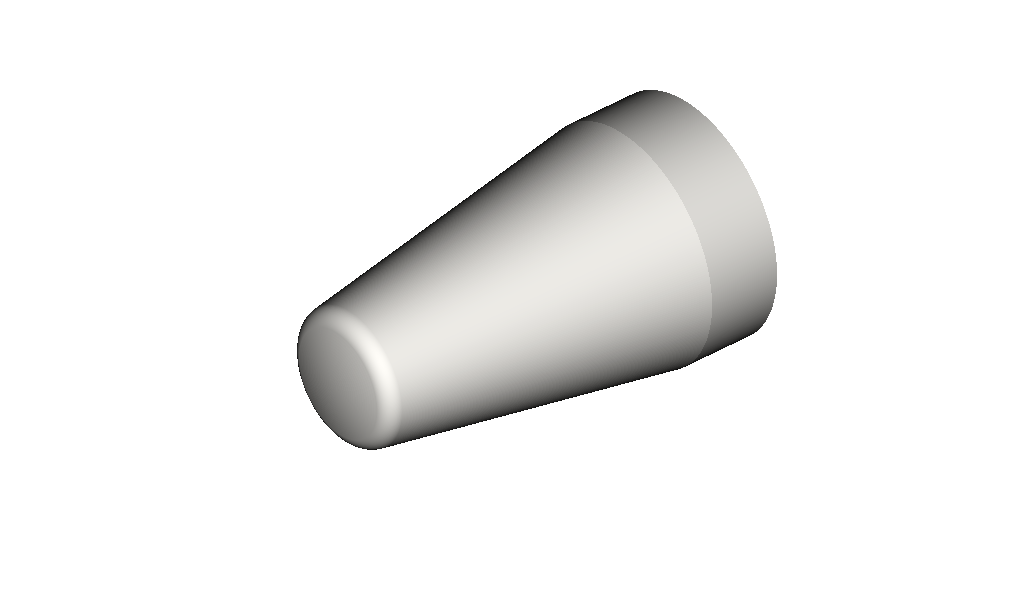
Geometry of the blunted cone forebody used in this case — the same case as the Getting Started tutorial.
Introduction
This tutorial assumes you've followed the installation instructions, and that you've already been through Getting Started.
Generally, CHAMPS+ has been developed with a focus on automated mesh generation, minimizing the setup required to get a simulation running. That said, some cases will inevitably require more flexible meshing control, so this tutorial walks through the options available under Domain::Grid: per-direction spacing and static refinement zones tied to surface patches or geometric regions.
Case Summary
| Quantity | Value |
|---|---|
| Freestream Mach number | 6 |
| Angle of attack | 12.5° |
| Freestream pressure () | 10 kPa |
| Freestream temperature () | 100 K |
Integration::max_steps is set to 0 in input.sdf. The focus here is purely on the generated mesh, so the solver initializes the grid and exits immediately, without advancing the solution.
This tutorial's input.sdf strips out everything not needed to generate a mesh: Domain::Grid::Refinement (the Spacing/RefinementZones/AMR block) is gone entirely, the base grid is defined explicitly via num_blocks/block_cells instead of dx_target/dx_tolerance, and the IO block has been removed since there's no solution to output. We'll build these back up piece by piece over the course of this tutorial.
Generating the Initial Mesh
champs+ input.sdf
With max_steps = 0, this finishes almost immediately — the solver builds the grid and the IBM surface representation, then exits without taking a single step. Output goes to sim/, but the piece you care about for this tutorial lives under sim/_debug/:
sim/
  _debug/    grid.main.vtk (the generated Cartesian mesh) and cone.vtk (the surface geometry)
  _cache/, _comm/, log/, restart/    used internally by the solver / not relevant here
grid.main.vtk only contains the blocks, not the individual cells within them — each block is drawn as a single cube regardless of its block_cells resolution.
Open both sim/_debug/grid.main.vtk and sim/_debug/cone.vtk together in ParaView, VisIt, or your viewer of choice — you need both loaded at once to see the generated grid alongside the surface it was built around. This is what you'll re-check after every change in this tutorial.
Building the mesh happens in three stages:
- Bounding box —
Domain::Grid::boundssets the outer extents of the domain,[xmin, xmax, ymin, ymax, zmin, zmax]. - Initial configuration — that box is divided into a lattice of blocks (
num_blocks), and each block is further divided into cells (block_cells), giving the base, unrefined Cartesian grid. - Refinement — static and adaptive refinement then locally subdivide that base grid near geometry or flow features.
This tutorial's input.sdf is a starting point for the rest of this walkthrough, defining stage 2 in its most explicit form:
Grid
{
    num_blocks     = [10, 10, 10]
    block_cells    = [12, 12, 12]
    bounds         = [-0.9, 1.9, -1.3, 1.3, 0.0, 1.3]
    exchange_cells = [2, 2, 2]
    exchange_order = 0
}
boundsis the bounding box from stage 1.num_blocks = [10, 10, 10]andblock_cells = [12, 12, 12]together define the initial configuration: a 10×10×10 lattice of blocks, each holding 12×12×12 cells. Each entry ofblock_cellsmust be divisible by 4.
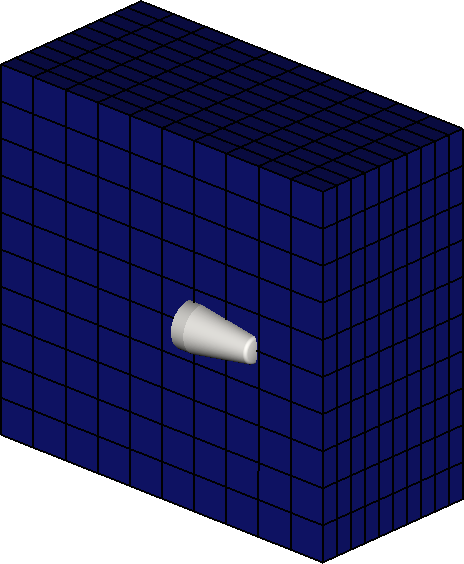
The initial mesh from sim/_debug/grid.main.vtk: a 10×10×10 lattice of blocks spanning bounds, shown here at block resolution (each block's 12×12×12 cells aren't individually drawn), with the cone surface from cone.vtk embedded but not yet resolved by any refinement.
Try changing the num_blocks values and rerunning to see how the initial configuration changes.
Refining Around a Geometry
Add a Refinement block to start stage 3 — it nests inside Grid, as a sibling of num_blocks/block_cells/bounds, not as its own top-level block:
Grid
{
    num_blocks     = [10, 10, 10]
    block_cells    = [12, 12, 12]
    bounds         = [-0.9, 1.9, -1.3, 1.3, 0.0, 1.3]
    exchange_cells = [2, 2, 2]
    exchange_order = 0
    Refinement
    {
        Spacing
        {
            surface_spacing = [0.002, 0.002, 0.002]
        }
        RefinementZones
        {
            surface_refine
            {
                specifier = "surface_component"
                spacing   = "surface_spacing"
                distance  = 0.05
            }
        }
    }
}
Spacingisn't a refinement rule by itself — it's just a place to name target resolutions (surface_spacinghere) once, so they can be shared by name acrossRefinementZonesand, later,AMR, rather than repeating the same numbers in each one.surface_refineis aRefinementZonesentry — asurface_componentzone, set by itsspecifier. The namesurface_refineitself is arbitrary, just likesurface_spacingabove: it doesn't select any particular behavior, it's simply a label for this zone that shows up in log output. Call it whatever's descriptive to you.- This zone refines any block within
distanceof the geometry surface down tosurface_spacing. Neithergeometrynorcomponentis set here, so both default to"any"— this refines around any geometry in the domain, not justcone.
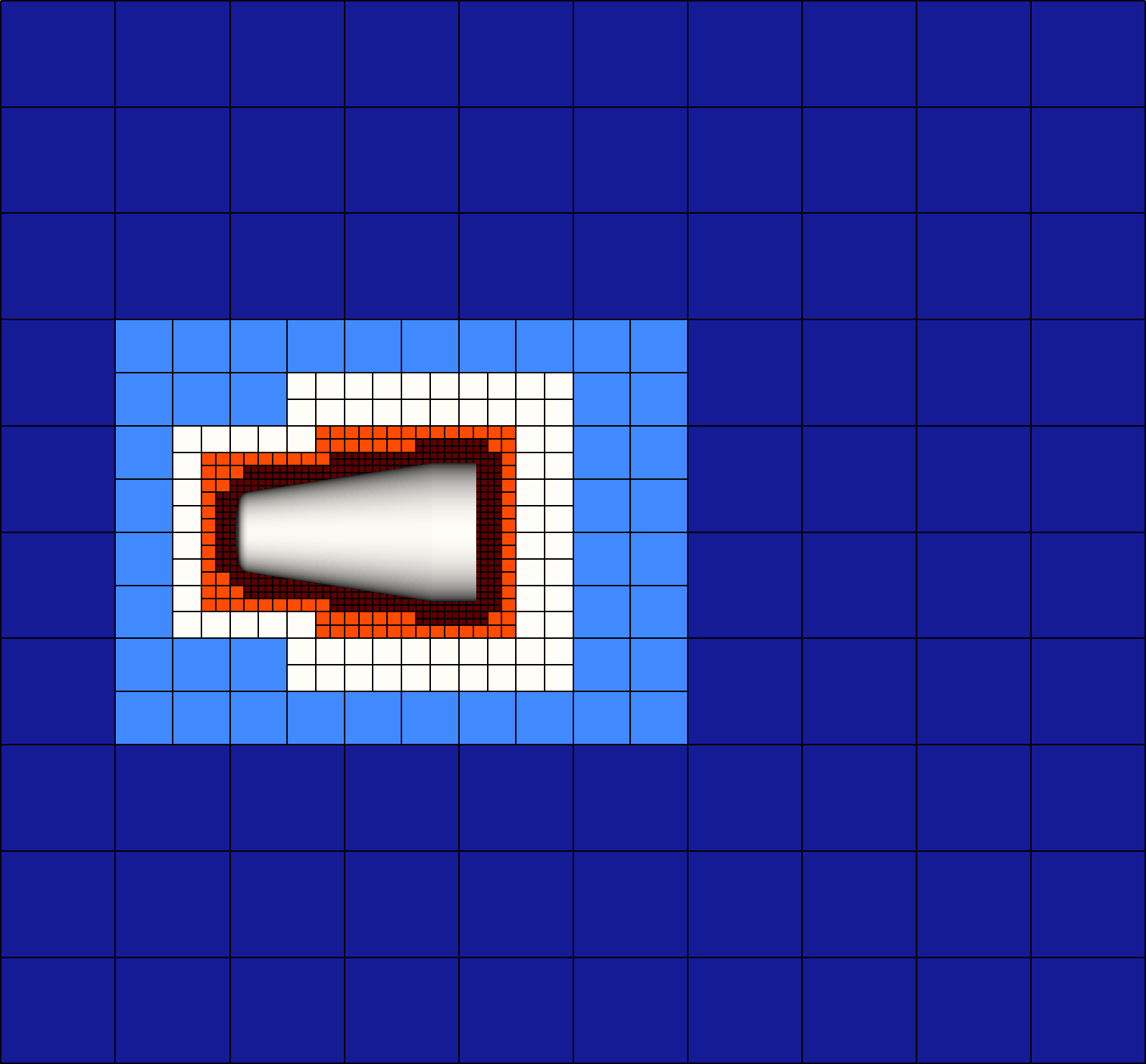
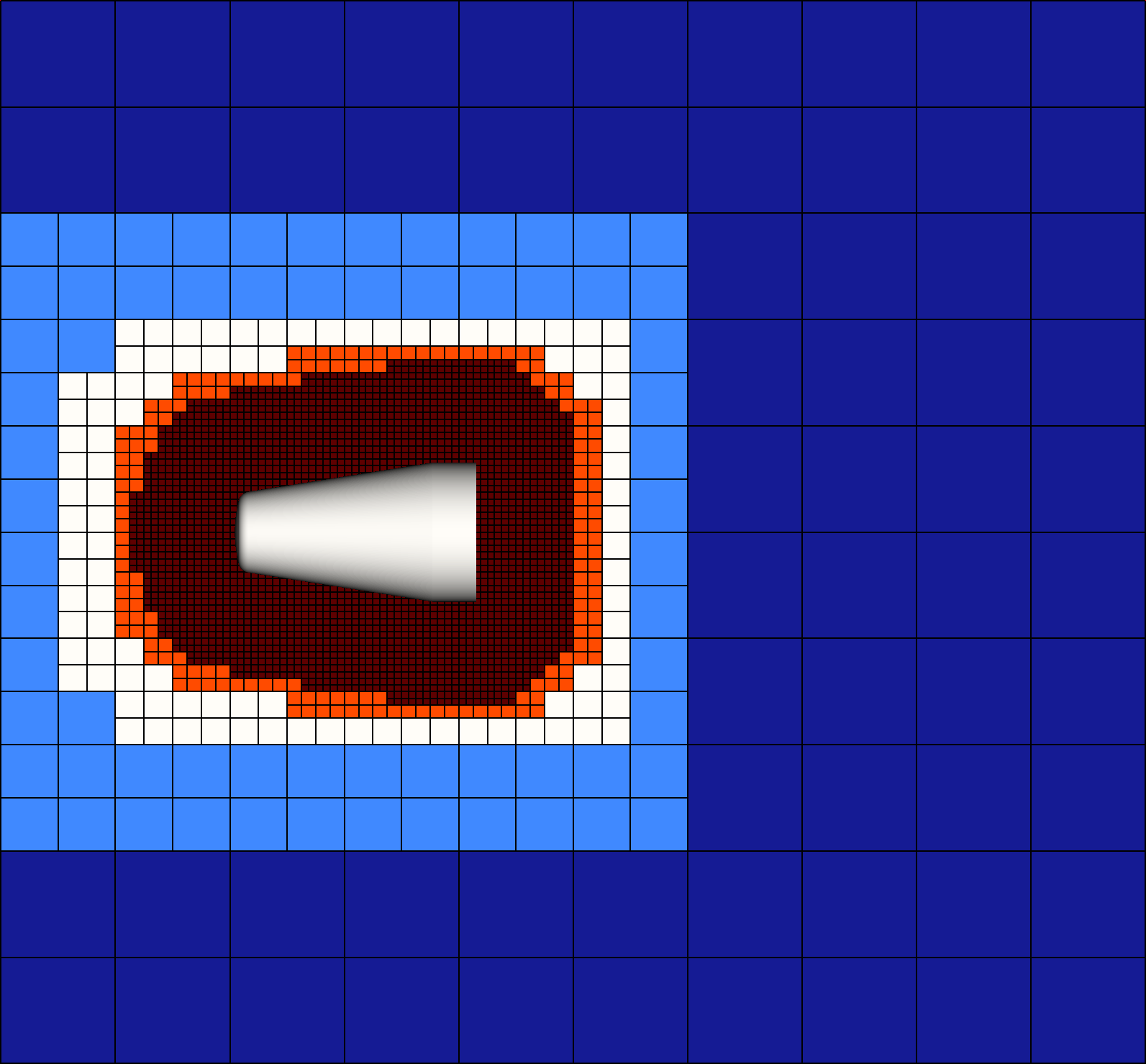
A z = 0 cross-section of sim/_debug/grid.main.vtk after adding surface_refine, with distance = 0.05 (left) versus distance = 0.25 (right): the refined region grows with distance, and at 0.25 it's already swallowing a large fraction of the domain.
distance smallAs distance grows, the number of blocks refined to surface_spacing grows with it — well past the region actually near the geometry, as seen above. A large distance can blow up the total cell count (and the time to generate and load the mesh) far more than it looks like it should from the number alone. Keep distance modest for the rest of this tutorial; 0.05, as used above, is a reasonable starting point.
Automatically Determining Block and Cell Counts
Picking num_blocks and block_cells by hand, as done so far, is unintuitive: there's no direct way to reason from "I want roughly 2 mm cells near the cone" to "10 blocks of 12 cells each." dx_target/dx_tolerance is an alternative way of defining the base grid from stage 2 that works backwards from num_blocks/block_cells — instead of picking a block layout and living with whatever spacing falls out of it, you give the solver a target spacing, and it automatically computes the num_blocks/block_cells layout for you. input.sdf now defines the base grid this way:
Grid
{
    // num_blocks     = [10, 10, 10]
    // block_cells    = [12, 12, 12]

    dx_target      = [0.002, 0.002, 0.002]
    dx_tolerance   = 0.05

    bounds         = [-0.9, 1.9, -1.3, 1.3, 0.0, 1.3]
    exchange_cells = [2, 2, 2]
    exchange_order = 0
    Refinement
    {
        ...
    }
}
Beyond just being more convenient, letting the solver pick the block/cell counts also avoids a real pitfall of guessing them by hand. Refinement only refines until the grid is at least as fine as the requested spacing — it never leaves a block coarser than what you asked for, but because it works by repeatedly halving (an octree: each refinement step cuts a block's spacing exactly in two), it can easily overshoot and land considerably finer than requested if the base spacing doesn't divide down to your target evenly. That's exactly what happened with the hand-picked num_blocks = [10, 10, 10]/block_cells = [12, 12, 12] base grid: requesting surface_spacing = [0.002, 0.002, 0.002] against it, the solver log reported
>> dx (min): [0.00145833, 0.00135417, 0.00135417]
— 27-32% finer than the 0.002 requested across the three directions, meaning a lot more cells near the surface than actually asked for. With dx_target/dx_tolerance computing the base grid instead, the same surface_spacing = [0.002, 0.002, 0.002] refinement zone lands much closer to the target:
>> dx (min): [0.00198864, 0.00193452, 0.00193452]
— within the dx_tolerance = 0.05 band, rather than overshooting by 30% or more. That overshoot isn't free: the hand-picked num_blocks/block_cells grid comes out to 13,305,600 cells, versus 6,465,024 for the dx_target/dx_tolerance version — over twice as many cells to resolve a spacing nobody asked for. Prefer dx_target/dx_tolerance over hand-picking num_blocks/block_cells whenever you have a target resolution in mind, which is most of the time.
Add a dx_surf entry to Dictionary, and use it for both Grid::dx_target and Refinement::Spacing::surface_spacing:
Dictionary
{
    ...
    dx_surf    = 0.002
}
dx_target = [dx_surf, dx_surf, dx_surf]
Spacing
{
    surface_spacing = [dx_surf, dx_surf, dx_surf]
}
Since the base grid's target spacing and the refinement zone's target spacing are both driven by the same dx_surf, changing one number controls the resolution of the whole mesh — base grid and surface refinement together — rather than having to update dx_target and surface_spacing separately and keep them in sync by hand.
Refining Around a Specific Patch
surface_refine targets the whole geometry (component = "any"), but a surface_component zone can just as easily target a single surface component instead, by setting component to that component's identifier. cone.vtk is made up of 5 surface components, numbered 0-4:
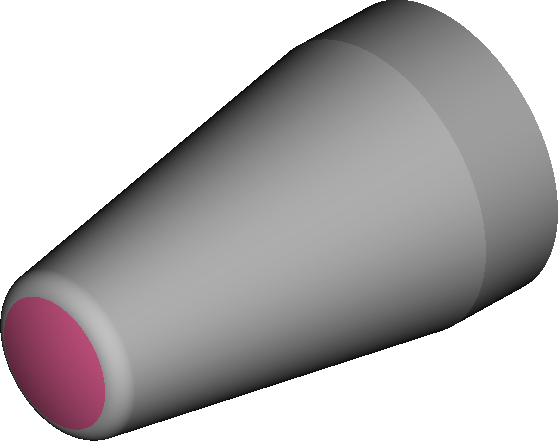
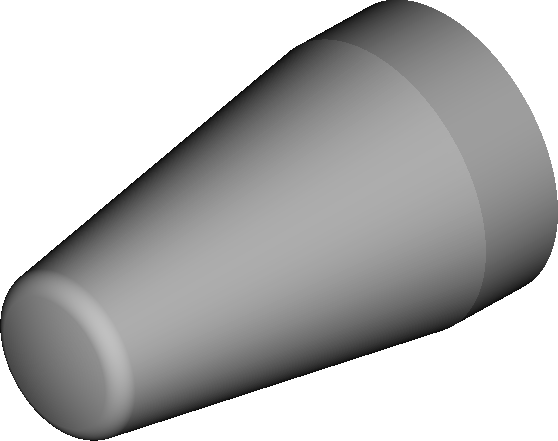
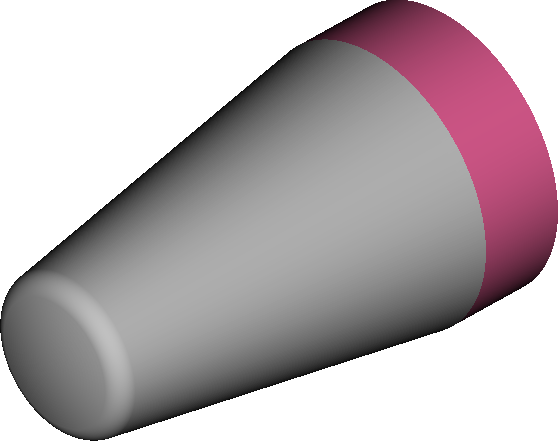
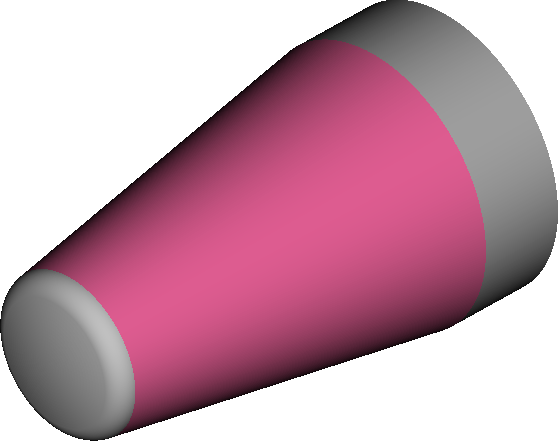
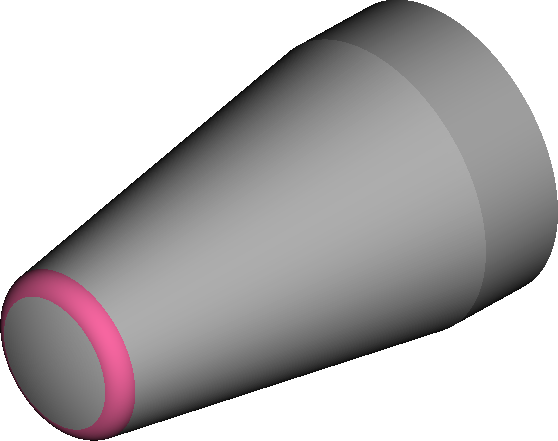
The 5 surface components of cone.vtk, numbered 0-4, each highlighted individually.
Add a second Spacing entry and a second RefinementZones entry alongside surface_refine:
Refinement
{
    Spacing
    {
        surface_spacing = [dx_surf, dx_surf, dx_surf]
        patch_spacing   = [dx_surf/2, dx_surf/2, dx_surf/2]
    }
    RefinementZones
    {
        surface_refine
        {
            specifier = "surface_component"
            spacing   = "surface_spacing"
            distance  = 0.15
        }
        patch_refine
        {
            specifier = "surface_component"
            spacing   = "patch_spacing"
            component = 4
            distance  = 0.05
        }
    }
}
patch_spacingis twice as fine assurface_spacing(dx_surf/2vs.dx_surf) — a second named resolution, defined the same way assurface_spacingback in Refining Around a Geometry.patch_refineis anothersurface_componentzone, just likesurface_refine, but withcomponent = 4instead of the default"any"— it only refines blocks near component 4 (down to the finerpatch_spacing), leaving the rest of the surface untouched by this zone.RefinementZonesentries are additive:surface_refinestill applies everywhere, andpatch_refinelayers extra refinement on top of it near component 4.
component always takes a string, never a number — it just so happens that cone.vtk, a VTK file, has its surface components labeled "0"-"4" by the loader, which makes component = 4 above look numeric. That's specific to VTK, not a general rule: a CGNS file, for instance, has named zones, so the equivalent geometry would have components like component = "nose_cap" or whatever that file's zones are actually called. Always check what a given geometry file's components are actually named — see the Supported Geometry File Formats reference — rather than assuming small integers.
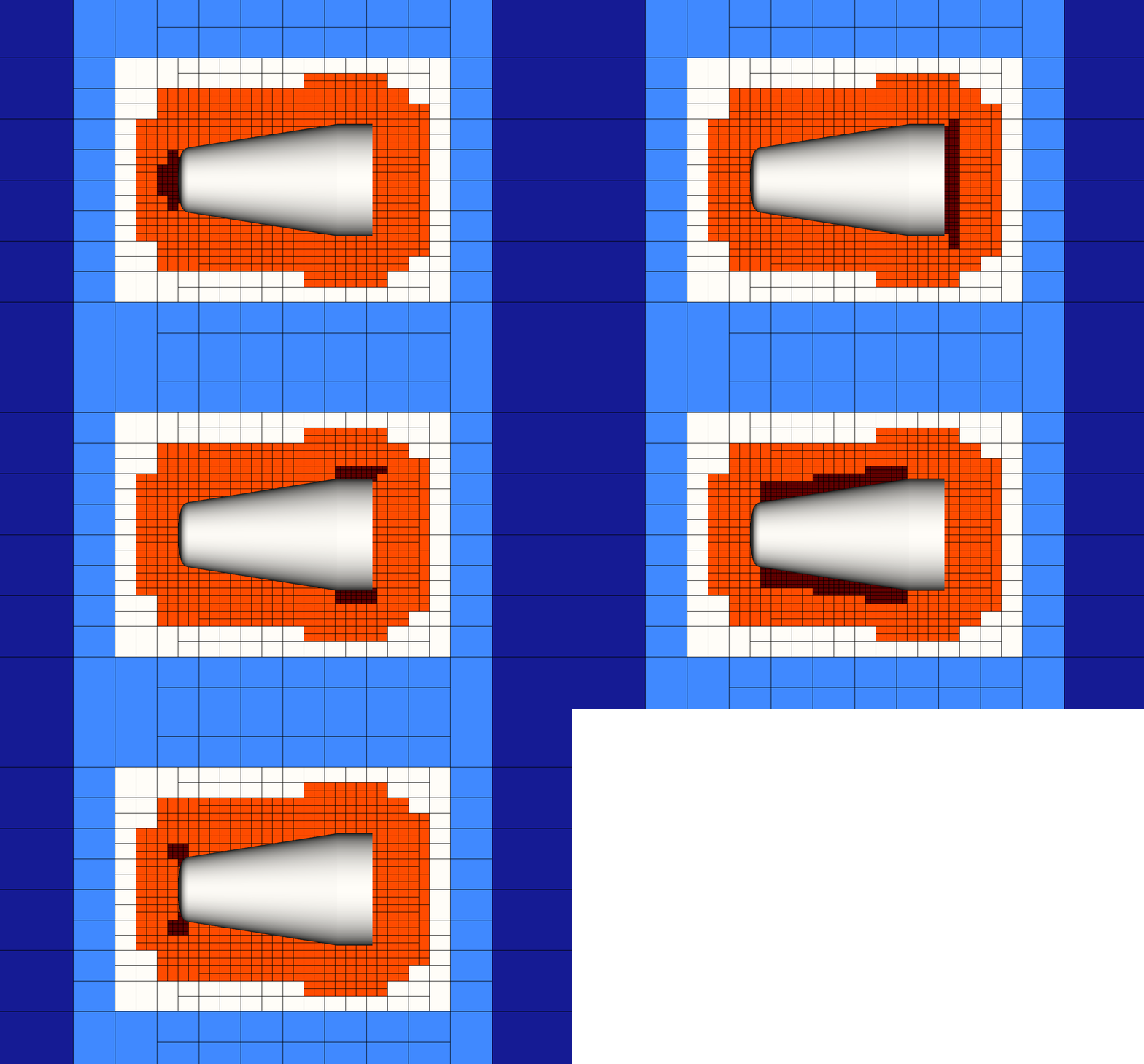
patch_refine with component cycled through each of the 5 components in turn: the extra pocket of refinement (darkest red) tracks whichever component is currently targeted, layered on top of the surface_refine band from before.
Beyond a single component's own identifier, component also accepts a name from a Patches block — an optional convenience for grouping and naming several components together, defined under Geometries, not Grid. Getting Started already grouped components "0" and "4" together under the name nose; add that same Patches block here and reference it by name instead:
Geometries
{
    cone
    {
        is_external = true
        filename    = "cone.vtk"
        Patches
        {
            nose = ["0", "4"]
        }
        Transforms
        {
            ...
        }
    }
}
patch_refine
{
    specifier = "surface_component"
    spacing   = "patch_spacing"
    component = nose
    distance  = 0.05
}
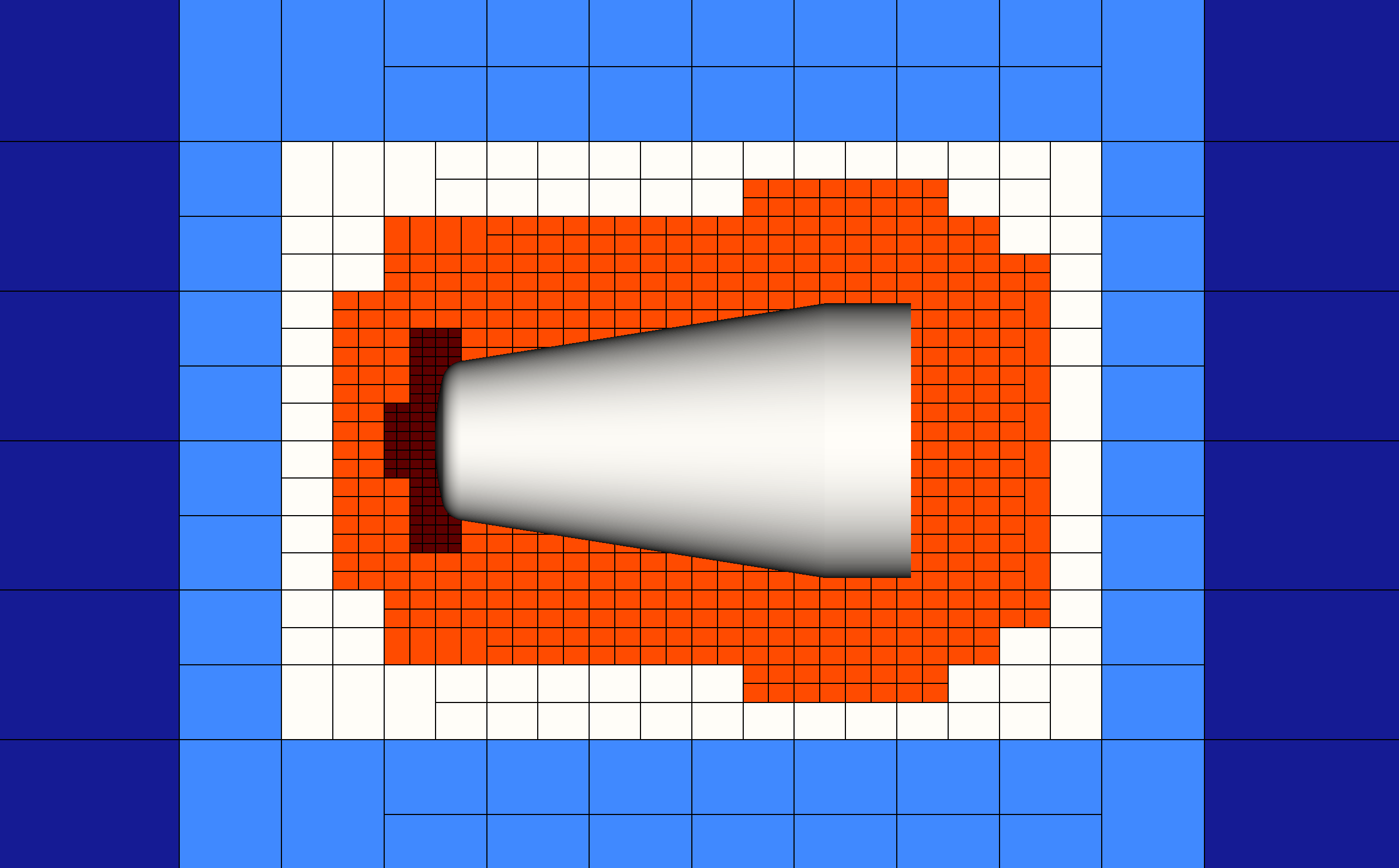
patch_refine with component = nose: the extra refinement now covers both components 0 and 4 together — the same grouped nose region highlighted back in Getting Started — rather than either one individually.
Refining a Geometric Region
Every zone so far has been a surface_component zone — refining relative to a geometry's surface. Not every refinement need is tied to a surface, though: a sphere zone instead refines any block that intersects a sphere you define directly, independent of where any geometry is. Add one to RefinementZones:
sphere_refine
{
    specifier = "sphere"
    spacing   = "patch_spacing"
    center    = [0.3, 0, 0]
    radius    = 0.2
}
centerandradiusdefine the sphere directly, in the same solver units as everything else inDomain— unlikesurface_component,distanceplays no part here by default, because the sphere itself already defines the refined region rather than a distance from a surface.- This particular sphere is centered at
[0.3, 0, 0]withradius = 0.2, which happens to land near the aft (rear) end of the cone rather than the nose — refinement zones don't need to be anywhere near the other zones already defined, or even near the geometry at all.
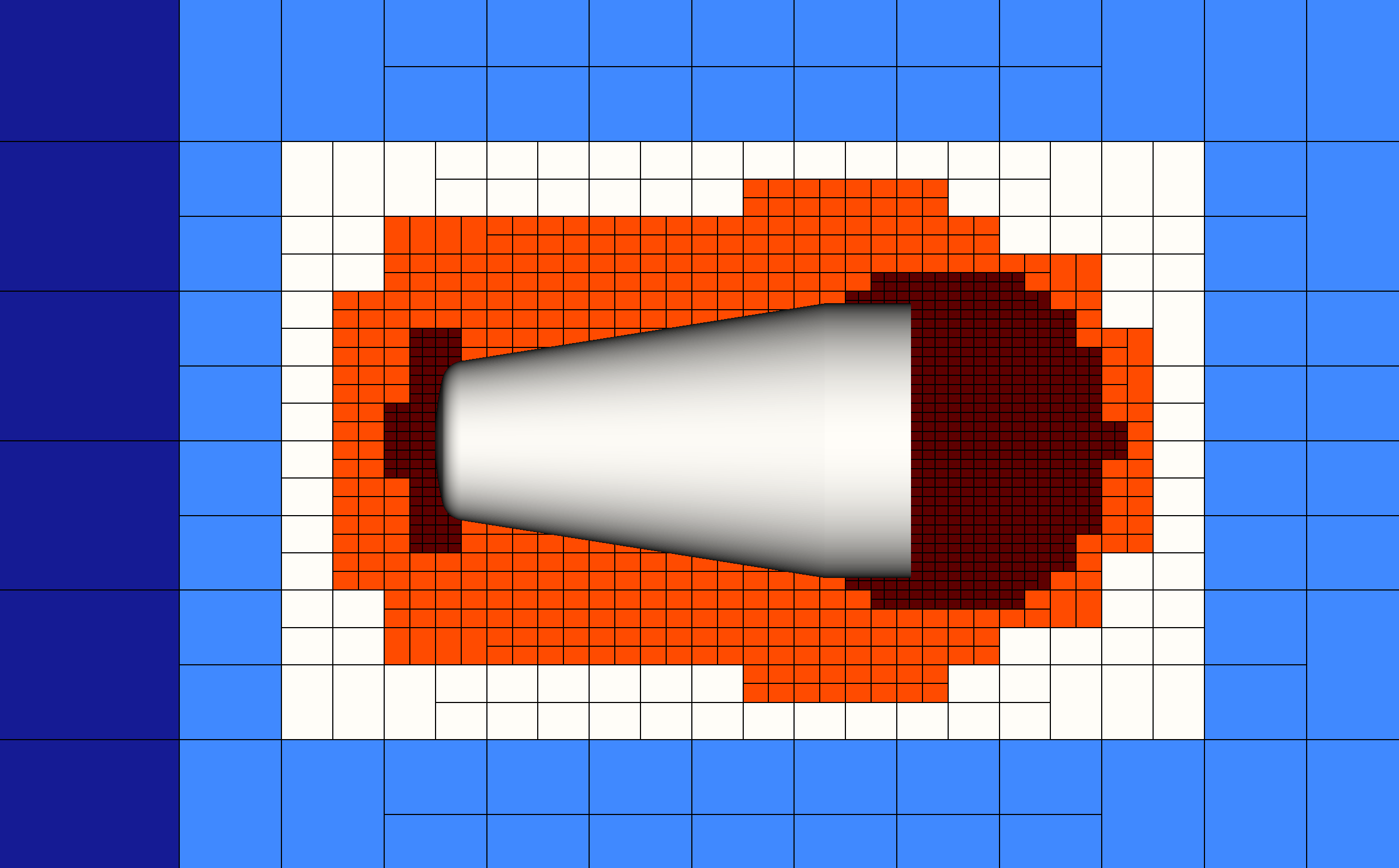
sphere_refine refines any block intersecting the sphere down to patch_spacing, regardless of proximity to cone's surface — here that lands over the aft end of the body, alongside the unrelated surface_refine/patch_refine zones still active near the nose.
Every specifier shares a couple of common fields beyond its own (center/radius here, component/geometry for surface_component, and so on): on_surface and distance. So far on_surface has been left at its default — false for sphere (it's forced true for surface_component, which is why surface_refine and patch_refine needed distance from the start). Set both explicitly to restrict sphere_refine to just the part of the sphere that's actually near a surface:
sphere_refine
{
    specifier  = "sphere"
    spacing    = "patch_spacing"
    center     = [0.3, 0, 0]
    radius     = 0.2
    on_surface = true
    distance   = 0.05
}
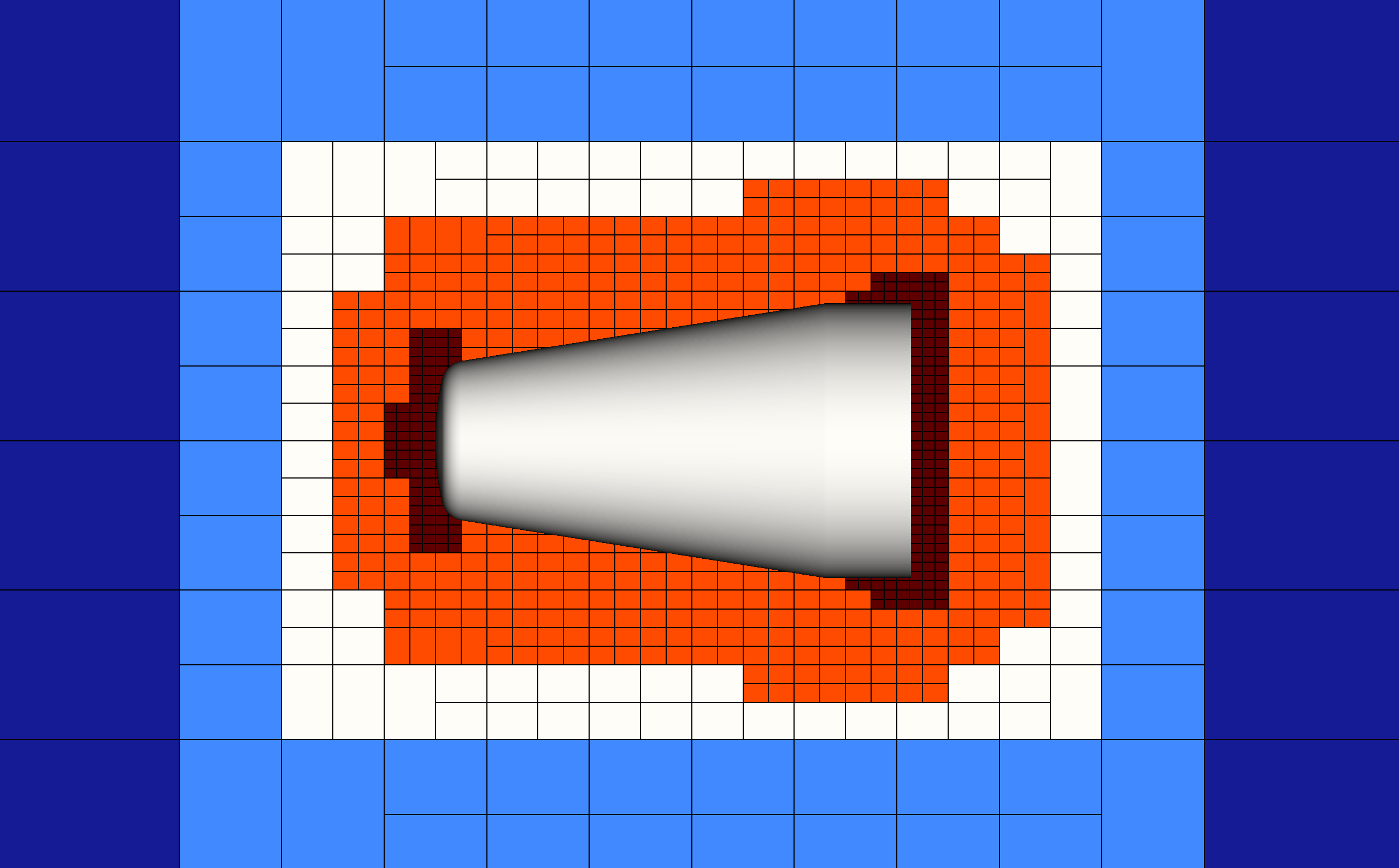
The same sphere with on_surface = true and distance = 0.05: refinement is now a thin shell hugging the cone's surface within the sphere, instead of filling the sphere's whole interior as in the previous figure.
on_surface and distance aren't specific to sphere — they, along with every other field covered in this tutorial, apply the same way across all RefinementZones specifiers (box, cylinder, triangulation, and more). See the Grid Generation reference for the complete list of specifiers and fields, including ones not covered here.
Summary
Each step below is the relevant snippet of input.sdf right after that change — use it to get back to a known-good state if you've lost track of where an edit left things.
After Generating the Initial Mesh — the starting point
Grid
{
    num_blocks     = [10, 10, 10]
    block_cells    = [12, 12, 12]
    bounds         = [-0.9, 1.9, -1.3, 1.3, 0.0, 1.3]
    exchange_cells = [2, 2, 2]
    exchange_order = 0
}
After Refining Around a Geometry
Grid
{
    num_blocks     = [10, 10, 10]
    block_cells    = [12, 12, 12]
    bounds         = [-0.9, 1.9, -1.3, 1.3, 0.0, 1.3]
    exchange_cells = [2, 2, 2]
    exchange_order = 0
    Refinement
    {
        Spacing
        {
            surface_spacing = [0.002, 0.002, 0.002]
        }
        RefinementZones
        {
            surface_refine
            {
                specifier = "surface_component"
                spacing   = "surface_spacing"
                distance  = 0.05
            }
        }
    }
}
After Automatically Determining Block and Cell Counts
Grid
{
    // num_blocks     = [10, 10, 10]
    // block_cells    = [12, 12, 12]

    dx_target      = [0.002, 0.002, 0.002]
    dx_tolerance   = 0.05

    bounds         = [-0.9, 1.9, -1.3, 1.3, 0.0, 1.3]
    exchange_cells = [2, 2, 2]
    exchange_order = 0
    Refinement
    {
        Spacing
        {
            surface_spacing = [0.002, 0.002, 0.002]
        }
        RefinementZones
        {
            surface_refine
            {
                specifier = "surface_component"
                spacing   = "surface_spacing"
                distance  = 0.05
            }
        }
    }
}
After the single-parameter refinement tip (dx_surf)
Dictionary
{
    ...
    dx_surf  = 0.002
}
Grid
{
    // num_blocks     = [10, 10, 10]
    // block_cells    = [12, 12, 12]

    dx_target      = [dx_surf, dx_surf, dx_surf]
    dx_tolerance   = 0.05

    bounds         = [-0.9, 1.9, -1.3, 1.3, 0.0, 1.3]
    exchange_cells = [2, 2, 2]
    exchange_order = 0
    Refinement
    {
        Spacing
        {
            surface_spacing = [dx_surf, dx_surf, dx_surf]
        }
        RefinementZones
        {
            surface_refine
            {
                specifier = "surface_component"
                spacing   = "surface_spacing"
                distance  = 0.05
            }
        }
    }
}
After Refining Around a Specific Patch (before grouping into nose)
Refinement
{
    Spacing
    {
        surface_spacing = [dx_surf, dx_surf, dx_surf]
        patch_spacing   = [dx_surf/2, dx_surf/2, dx_surf/2]
    }
    RefinementZones
    {
        surface_refine
        {
            specifier = "surface_component"
            spacing   = "surface_spacing"
            distance  = 0.15
        }
        patch_refine
        {
            specifier = "surface_component"
            spacing   = "patch_spacing"
            component = 4
            distance  = 0.05
        }
    }
}
Note surface_refine's distance moved from 0.05 to 0.15 at this point in the tutorial — a deliberate change for the demos from here on, not a typo.
After grouping components into nose via Patches
Geometries
{
    cone
    {
        is_external = true
        filename    = "cone.vtk"
        Patches
        {
            nose = ["0", "4"]
        }
        Transforms
        {
            scale
            {
                specifier = "scale"
                scales    = [0.001, 0.001, 0.001]
            }
        }
    }
}
patch_refine
{
    specifier = "surface_component"
    spacing   = "patch_spacing"
    component = nose
    distance  = 0.05
}
After Refining a Geometric Region (sphere_refine added)
sphere_refine
{
    specifier = "sphere"
    spacing   = "patch_spacing"
    center    = [0.3, 0, 0]
    radius    = 0.2
}
Final state — sphere_refine restricted to the surface
sphere_refine
{
    specifier  = "sphere"
    spacing    = "patch_spacing"
    center     = [0.3, 0, 0]
    radius     = 0.2
    on_surface = true
    distance   = 0.05
}
This is the same sphere_refine shown at the end of Refining a Geometric Region, and matches the RefinementZones entry currently in input.sdf.