Getting Started
Last updated: September 7, 2026
Files
| File | Description |
|---|---|
input.sdf | Input file |
cone.vtk | Triangulation for the blunt cone geometry |
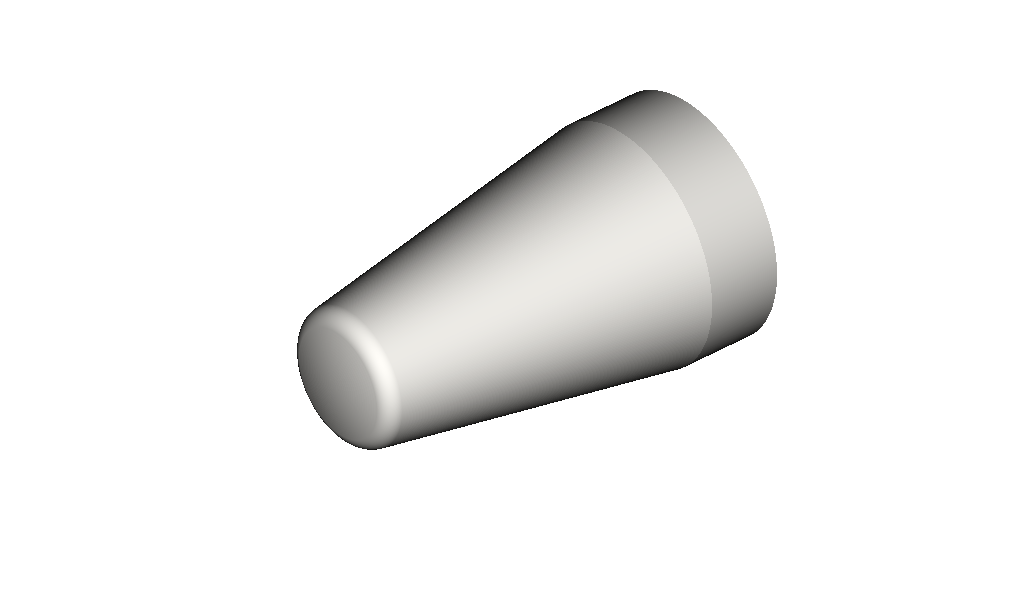
Geometry of the blunted cone forebody used in this case.
Introduction
This tutorial assumes you've followed the installation instructions.
This is an inviscid, hypersonic test case: uniform Mach 6 flow over a blunted cone at a 12.5° angle of attack, based on the forebody geometry from NASA TN D-1790 (Holloway & Dunavant, 1963). The cone surface is given as a triangulated cone.vtk geometry and represented on the Cartesian grid using the immersed boundary method (IBM), with a slip-wall boundary condition. Time-accurate explicit time integration is used. In this tutorial, you will run the CHAMPS+ solver for the first time and take a brief look through the input file to familiarize yourself with its format and conventions.
Case Summary
| Quantity | Value |
|---|---|
| Freestream Mach number | 6 |
| Angle of attack | 12.5° |
| Freestream pressure () | 10 kPa |
| Freestream temperature () | 100 K |
| Initial grid size | 15.9 million cells |
| Minimum grid spacing () | 967 μm (target 1 mm) |
Running the Case
To run this case, simply invoke:
champs+ input.sdf
If you have multiple GPUs available and want to distribute the run across, say, two of them:
champs+ -dev 0,1 input.sdf
See the command line reference for the full set of available flags, including other device-selection options.
The first time you run this case on a given machine, you may notice a pause of a few minutes while cone.vtk is being read and the IBM geometry is set up. This is the GPU's JIT compiler translating PTX into SASS instructions for your specific GPU architecture — a one-time cost that gets cached, so subsequent runs start up much faster.
The case runs for max_steps = 15000 steps (Integration::max_steps) at CFL = 0.45 using explicit ssprk3 time integration. On a single GPU, expect this case to run in 5-20 minutes, depending on the specific GPU.
Running the case creates a sim/ output directory (set by IO::output_directory) with the following structure:
sim/
  log/            solver log files
  restart/        binary .db checkpoint files, written every Restart::output_interval steps (1000); usable to restart another simulation
  slice/
    sym_plane/    the z = 0.001 symmetry-plane slice defined under IO::Outputs::sym_plane, written every 1000 steps — open the .vtm files in ParaView
  surface/
    surf_out/     body-surface fields defined under IO::Outputs::surf_out, written every 1000 steps — .vtk files, open in ParaView
  profile/
    press_out/    pressure/Cp profile CSVs defined under IO::Outputs::press_out, written every 1000 steps
  _cache/         used internally by the solver
  _comm/          used internally by the solver
  _debug/         used internally by the solver
Subdirectories prefixed with an underscore are used internally by the solver and can generally be ignored — the results you care about for this case are in log/, restart/, slice/, surface/, and profile/.
Results
Run the case to completion and compare your sym_plane slice output against the figures below.
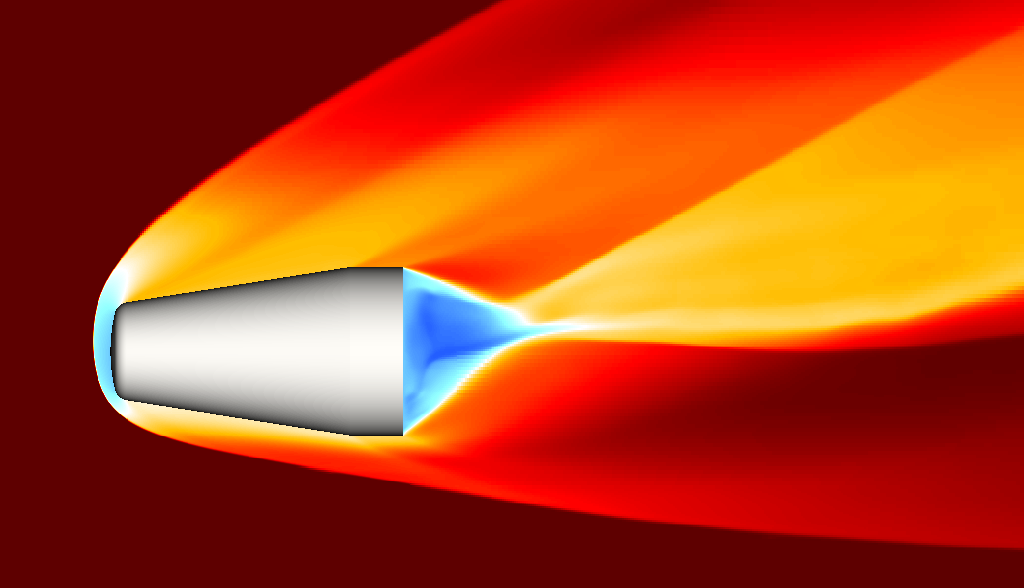
Symmetry-plane slice of (streamwise Mach number): a bow shock stands off the blunted nose, with a subsonic pocket (blue) near the tip and in the wake.
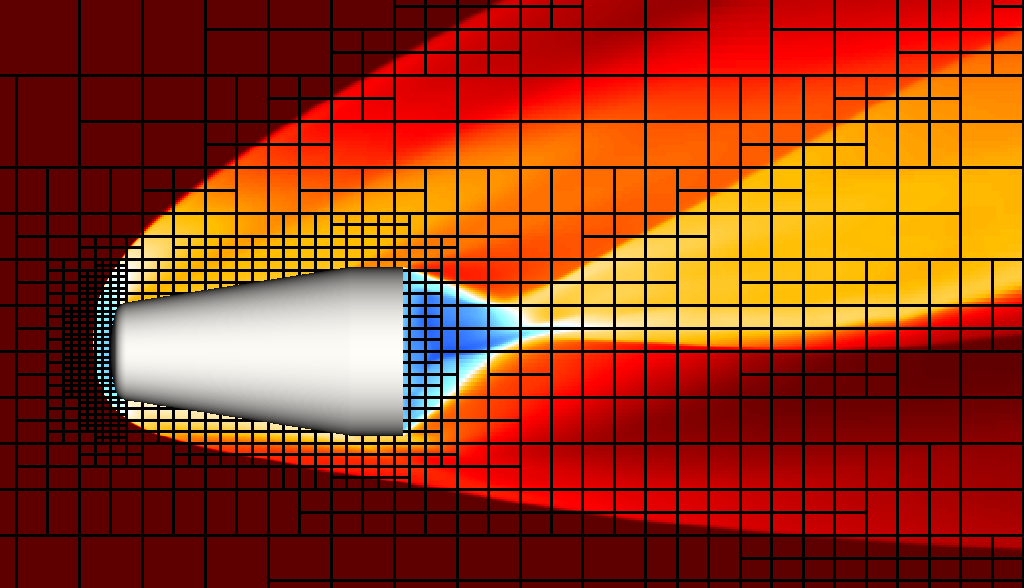
The same slice with grid blocks overlaid: spacing is finest at the nose, coarser over the rest of the body, and refined again along the bow shock, courtesy of the nose/body Refinement::Spacing levels and an AMR criterion that refines to body spacing wherever the local pressure difference exceeds a threshold.
The sym_plane slice only exports the primitive variables {P, T, U, V, W} — Mach number isn't written out directly. Compute it in your postprocessing tool of choice (Tecplot, ParaView, VisIt, ...) as .
The Input File at a Glance
Let's walk through input.sdf from top to bottom to see how this case is put together.
This is a quick, top-to-bottom pass to get you oriented — you don't need to absorb every option on the first read. Each block below links to its full reference page, and later tutorials will revisit these same sections in more depth.
Dictionary
Dictionary
{
    Tref     = 100.0
    gamma    = 1.4
    Rgas     = 287.15
    mach     = 6
    aoa      = 12.5
    umag     = mach*sqrt(gamma*Rgas*Tref)
    Lscale   = 1.0
    dxmin    = 0.001
    Qinf
    {
        pinf     = 10000.0
        Tinf     = Tref
        uinf     = umag*cos(aoa*#pi/180.0)
        vinf     = umag*sin(aoa*#pi/180.0)
        winf     = 0.0
        rhoinf   = Qinf::pinf/(Rgas*Tref)
    }
}
Dictionary isn't a fixed schema — unlike blocks such as Domain or Integration, it doesn't have a required set of keys. You can define any key names you like, as plain numbers or as expressions referencing other keys defined above them. A key only does anything if it's actually referenced elsewhere — in another Dictionary expression, or in a string expression inside a block like InitialCondition or Refinement; an unreferenced key is just inert. That's what makes Dictionary useful as a parameterization layer: define a case's "knobs" once at the top, under whatever names make sense, then reference them everywhere they're needed throughout the rest of the file. It is recommended to have as few dictionary parameters as you need to run the simulation that you are interested in.
None of these keys are mandatory — they only do anything because they're referenced by name later in the file. Here, the Dictionary is used to front-load the basic gas-dynamics calculations, so the rest of the input file can be written in terms of physically meaningful case parameters instead of raw numbers:
Tref,gamma, andRgasset the reference gas state and ideal-gas constant.machandaoaare the two real "knobs" of this case — freestream Mach number and angle of attack.umagcomputes the freestream speed frommachvia .Lscaleis a characteristic length, used further down to define the simulation's characteristic time inIntegration.dxminis the target minimum grid spacing, used further down inDomain::Grid.- The nested
Qinfgroup resolvesumaginto Cartesian velocity components usingaoa(, ), and computes the freestream densityrhoinffrom the ideal gas law.
Because uinf, vinf, and rhoinf are all expressed in terms of mach, aoa, and the reference gas properties, changing mach or aoa and rerunning is enough to retarget the whole case to a new flow condition — every place that references Qinf::uinf, Qinf::vinf, etc. later in the file (the InitialCondition and DomainBC blocks) picks up the change automatically.
Geometries
Geometries
{
    cone
    {
        is_external = true
        filename    = "cone.vtk"
        Patches
        {
            nose = ["0", "4"]
        }
        Transforms
        {
            scale
            {
                specifier = "scale"
                scales    = [0.001, 0.001, 0.001]
            }
        }
    }
}
This defines a single geometry, cone, loaded from the triangulated surface file cone.vtk. See the Geometries reference for the full schema, and Supported Geometry File Formats for which surface file types filename accepts.
is_external = truetells the solver that flow is external to the body, as opposed to internal (e.g. duct/pipe) flow.Patchesassigns a human-readable name to a subset of the surface, by id, for use elsewhere in the file. Here,nose = ["0", "4"]groups two surface components from the source file into a single named region,nose.
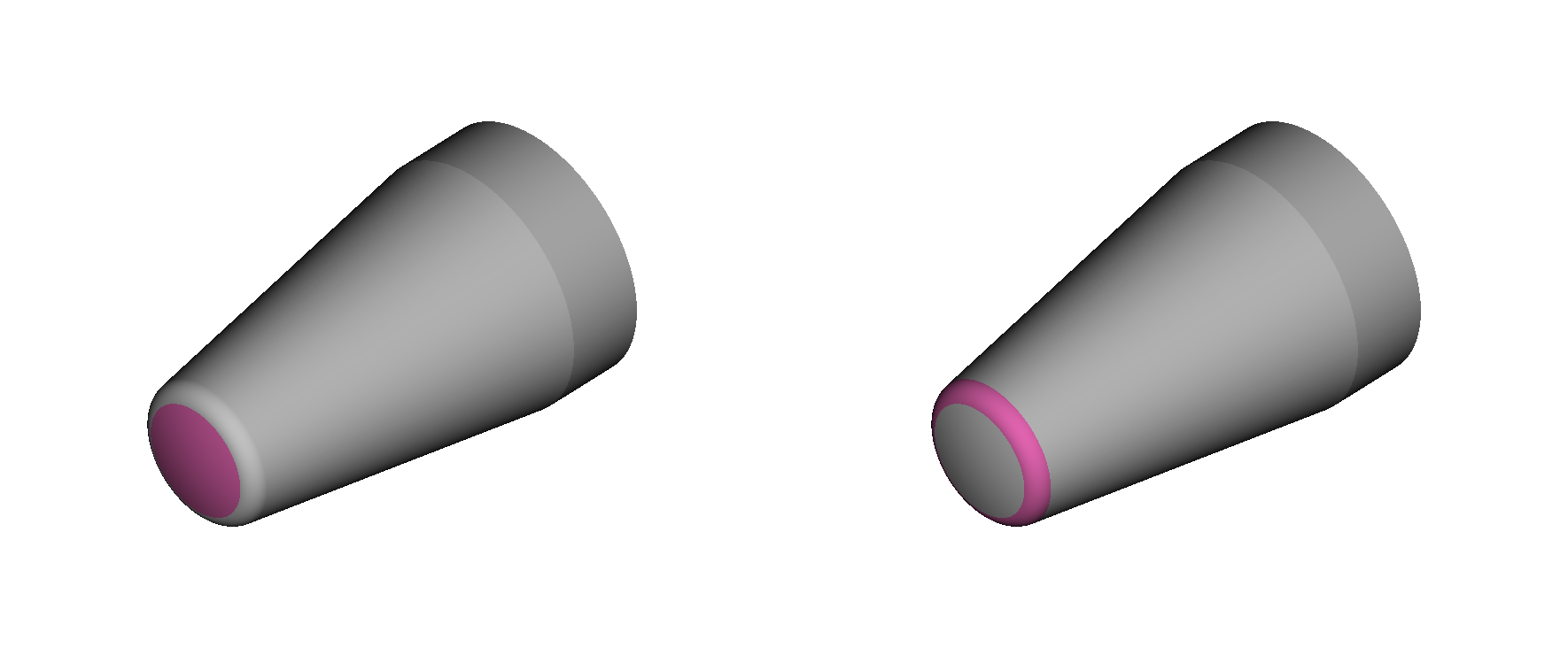
Surface components "0" (left) and "4" (right) from cone.vtk: together they make up the rounded nose cap, tangent to the rest of the conical body.
Exactly how these component ids come out of the CAD/mesh export isn't something you need to worry about for this tutorial. What matters is the mechanism: once a set of faces is grouped under a Patches name, that name can be referenced anywhere else in the input file — which is exactly what happens later on, when nose is used to target the finest static refinement level onto just this region.
Transformsapplies an ordered list of transformations to the geometry — see the Transforms reference for the other available specifiers (translate, rotate). Here there's a singlescaletransform,[0.001, 0.001, 0.001], convertingcone.vtk's native units — millimeters — into the meters used throughout the rest of the input file.
Domain
Domain is the biggest block in the file: it defines the computational grid, refinement strategy, physics model, numerical schemes, initial condition, and boundary conditions all in one place. It's organized into several sub-blocks — we'll go through the ones used in this case in the order they appear:
Grid— the base Cartesian mesh, plus static and adaptive refinementIBM— boundary conditions on the immersed cone surfaceProperties— the physics modelNumerical— convective/viscous flux schemesInitialCondition— the starting flow fieldDomainBC— boundary conditions on the outer domain box
Grid
Grid
{
    dx_target      = [dxmin, dxmin, dxmin]
    dx_tolerance   = 0.05
    bounds         = [-0.9, 1.9, -1.3, 1.3, 0.0, 1.3]
    exchange_cells = [2, 2, 2]
    exchange_order = 0
}
dx_target/dx_tolerancedefine the base grid indirectly: instead of specifying block counts directly, you give a target spacing (heredxminin all three directions, fromDictionary) and a one-sided tolerance, and the solver picks a block layout whose realized spacing is never coarser than the target.boundssets the outer extents of the domain box,[xmin, xmax, ymin, ymax, zmin, zmax]. Notezmin = 0.0: this case only simulates thez ≥ 0half of the (symmetric) flowfield — seeZminunderDomainBCbelow.exchange_cells/exchange_ordercontrol the ghost-cell halo exchanged between blocks of differing refinement;exchange_order = 0trades some interpolation accuracy for robustness, which is the recommended choice for shock-dominated flows like this one.
Refinement is nested inside Grid, and starts with a set of named target spacings:
Refinement
{
    Spacing
    {
        body   = [2*dxmin, 2*dxmin, 2*dxmin]
        nose   = [dxmin, dxmin, dxmin]
    }
bodyandnoseare just names — twice the base spacing, and the finest spacing (dxmin), respectively — referenced by the zones and AMR rule below.
Those spacings are applied to two static RefinementZones:
    RefinementZones
    {
        surf2
        {
            specifier = "surface_component"
            component = "any"
            geometry  = "any"
            spacing   = "body"
            distance  = "90*dxmin"
        }
        surf1
        {
            specifier = "surface_component"
            component = "nose"
            geometry  = "any"
            spacing   = "nose"
            distance  = "90*dxmin"
        }
    }
- Both are
surface_componentzones: they statically refine any block withindistanceof a given surface component to the givenspacing.surf2applies the coarserbodyspacing within90*dxminof the whole cone surface (component = "any");surf1then overrides that with the finernosespacing over the same distance, but only near thenosepatch defined back inGeometries— this is exactly the "finest static refinement level targeted onto just this region" mentioned earlier.
Finally, an AMR rule adds dynamic refinement on top of the static zones:
    AMR
    {
        ref0
        {
            specifier        = "relative_difference"
            threshold        = 0.25
            variable         = "pressure"
            spacing          = "body"
            start_interval   = 10000
            update_interval  = 500
        }
    }
}
ref0refines any block tobodyspacing wherever the relative difference inpressurebetween neighboring cells exceedsthreshold = 0.25— this is what tracks and refines the bow shock as it forms and moves, starting at step 10000 and re-evaluated every 500 steps thereafter. This is the mechanism behind the shock-aligned refinement band visible in Figure 3 back in Results.
IBM
IBM
{
    BoundaryConditions
    {
        default
        {
            component  = "any"
            geometries = "any"
            specifier  = "slipwall"
        }
    }
}
IBMattaches boundary conditions to the immersed cone surface — as opposed toDomainBCbelow, which handles the outer domain box faces. Here there's a singledefaultrule applyingslipwall(an inviscid wall: tangential flow is extrapolated, wall-normal velocity is cancelled) to every component (component = "any") of every geometry (geometries = "any"), consistent with this being an inviscid case.
Properties
Properties
{
    phys_model = "ideal_gas"
    gamma  = "gamma"
    Rgas   = "Rgas"
}
- Selects the
ideal_gasphysics model, whose primitive variables are{P, U, V, W, T}— the same set used throughoutInitialConditionand the BC blocks.gammaandRgasreference the values of the same name defined back inDictionary, so the freestream calculations and the solver's equation of state stay in sync.
Numerical
Numerical
{
    conv_scheme_ibm = "auto"
    conv_scheme     = "charweno"
    visc_scheme     = "none"
}
conv_scheme = "charweno"is a pure third-order characteristic-WENO convective scheme — the recommended choice for inviscid hypersonic cases like this one, since it's robust to strong shocks.conv_scheme_ibm = "auto"mirrors that same scheme near the immersed cone surface.visc_scheme = "none"disables viscous fluxes entirely, consistent with this being an inviscid simulation.
InitialCondition
InitialCondition
{
    P = "Qinf::pinf"
    T = "Qinf::Tinf"
    U = "Qinf::uinf"
    V = "Qinf::vinf"
    W = "Qinf::winf"
}
- Initializes the entire domain to a uniform freestream state using the
Qinf::*values computed back inDictionary. There's no near-wall damping term here, so the solution starts as pure freestream everywhere, and the bow shock and subsonic pocket seen in Results form entirely from the flow's interaction with the immersed cone surface as the simulation advances.
DomainBC
DomainBC
{
    Xmin
    {
        specifier = "supersonic_inflow"
        P         = "Qinf::pinf"
        T         = "Qinf::Tinf"
        U         = "Qinf::uinf"
        V         = "Qinf::vinf"
        W         = "Qinf::winf"
    }
    Xmax { specifier = "supersonic_outflow" }
    Ymin { specifier = "supersonic_outflow" }
    Ymax { specifier = "supersonic_outflow" }
    Zmin { specifier = "symmetry" }
    Zmax { specifier = "supersonic_outflow" }
}
Xmin, the upstream face, is asupersonic_inflow: it fixes the full freestream state there using the sameQinf::*expressions asInitialCondition.Xmax,Ymin,Ymax, andZmaxaresupersonic_outflow, which simply extrapolates the interior state to the boundary — appropriate wherever the flow stays supersonic, as it does at the rest of this domain's outer faces.Zminis asymmetrycondition rather than an outflow: this is the mirror plane set up byboundsabove (zmin = 0.0) — the case only simulates thez ≥ 0half of the geometry, andsymmetryreflects that half-model to represent the full flowfield.
Restart
Restart
{
    file            = "none"
    output_interval = 1000
}
See the Restart reference for the full set of options. Here, file = "none" means the case starts cold from InitialCondition rather than loading a previous solution, and output_interval = 1000 writes a new checkpoint to the restart/ directory (already seen in Running the Case) every 1000 steps — one of which you could later point file at to resume this run.
Integration
Integration
{
    CFL           = 0.45
    scheme        = "ssprk3"
    max_steps     = 15000
    time_scale    = Lscale / umag
}
See the Integration reference for the other available schemes and time-step controls. This case uses the explicit ssprk3 scheme, holding a constant CFL = 0.45 and running for a fixed max_steps = 15000. time_scale is only used for reporting here (nothing in this file drives off max_time_char), and it reuses Lscale and umag from Dictionary to express the run length in convective time units instead of raw seconds.
IO
IO
{
    output_directory = sim
    Outputs
    {
        ignore_first_output  = false
        sym_plane
        {
            specifier        = "slice"
            position         = 0.001
            direction        = 2
            output_interval  = 1000
        }
        surf_out
        {
            specifier        = "surface"
            geometry         = "cone"
            output_interval  = 1000
        }
        press_out
        {
            specifier        = "profile"
            output_interval  = 1000
            Points
            {
                specifier  = "surface_slice"
                geometry   = "cone"
                components = ["any"]
                point      = [0.0, 0.0, .001]
                normal     = [0, 0, 1]
            }
            Exports
            {
                pressure    = "P"
                cp          = "(P - Qinf::pinf)/(0.5*Qinf::rhoinf*umag*umag)"
                velocity    = "U"
                temperature = "T"
            }
        }
    }
}
See the IO reference for the full set of output types and time-control keys. output_directory = sim names the sim/ tree already seen in Running the Case, and each block under Outputs produces one of its subdirectories:
sym_planeis asliceoutput — thez = 0.001symmetry-plane cut, written tosim/slice/sym_plane/.surf_outis asurfaceoutput on the"cone"geometry, written tosim/surface/surf_out/.press_outis aprofileoutput:Points::surface_slicesamples the same symmetry plane along the cone's surface, andExportsdefines what gets written per point.cpis another good example of an inline expression — it's computed on the fly fromPand theQinf::*freestream values fromDictionary, rather than being a raw solver variable likepressure,velocity, ortemperature.
All three write every output_interval = 1000 steps.